A tattoo artist website that handles the requests for you.
Your portfolio, plus a request flow built around how you actually book — reference images, placement and size, your deposit and reschedule policy stated before anyone hits send. It lands in a dashboard you run yourself. Not in your DMs.
The problem isn't your website. It's your DMs.
Most artists don't lose work because their site looks wrong. They lose it in the gap between someone deciding they want a piece and actually getting on your books.
- Requests arrive in Instagram DMs, where they get buried under people saying "🔥".
- Half of them are missing something — no reference, no placement, no size, no idea of budget — so every one becomes four messages.
- People ask about your deposit, your reschedule window and whether you'll draw something custom, over and over, because it's in a highlight nobody opens.
- Somebody who was ready to book on a Tuesday hears back on Friday and has cooled off.
- And all of it lives on a platform that decides who sees your work, and could change the rules or lock you out tomorrow.
A prettier site doesn't fix any of that. A request flow that asks the right questions up front — on something you own — does.
What the request flow asks for
Built from the way artists actually screen work, so what lands in your dashboard is already worth reading:
The piece
- Style — blackwork, traditional, realism, lettering, whatever you actually take
- Placement and rough size
- Reference images, attached to the request instead of scattered across a chat
- Their description of the idea, in their own words
The logistics
- Dates that work for them
- Flexible or fixed
- Anything you need to know before you quote
- Contact details that don't disappear when they change their handle
Your rules go on the page, not in a highlight. Deposit required. Reschedules need 72 hours' notice. You draw the piece — no exact copies. No free touch-ups after 60 days. Whatever your policy actually is, it sits where someone reads it before they send a request, which means fewer awkward conversations later.
The dashboard behind it
Requests land in a pipeline you move through — new, talking, booked, declined — so you can see at a glance what's waiting on you and what's waiting on them. Open one and everything they sent is on a single screen: style, size, placement, dates, references, and a private note field only you see.
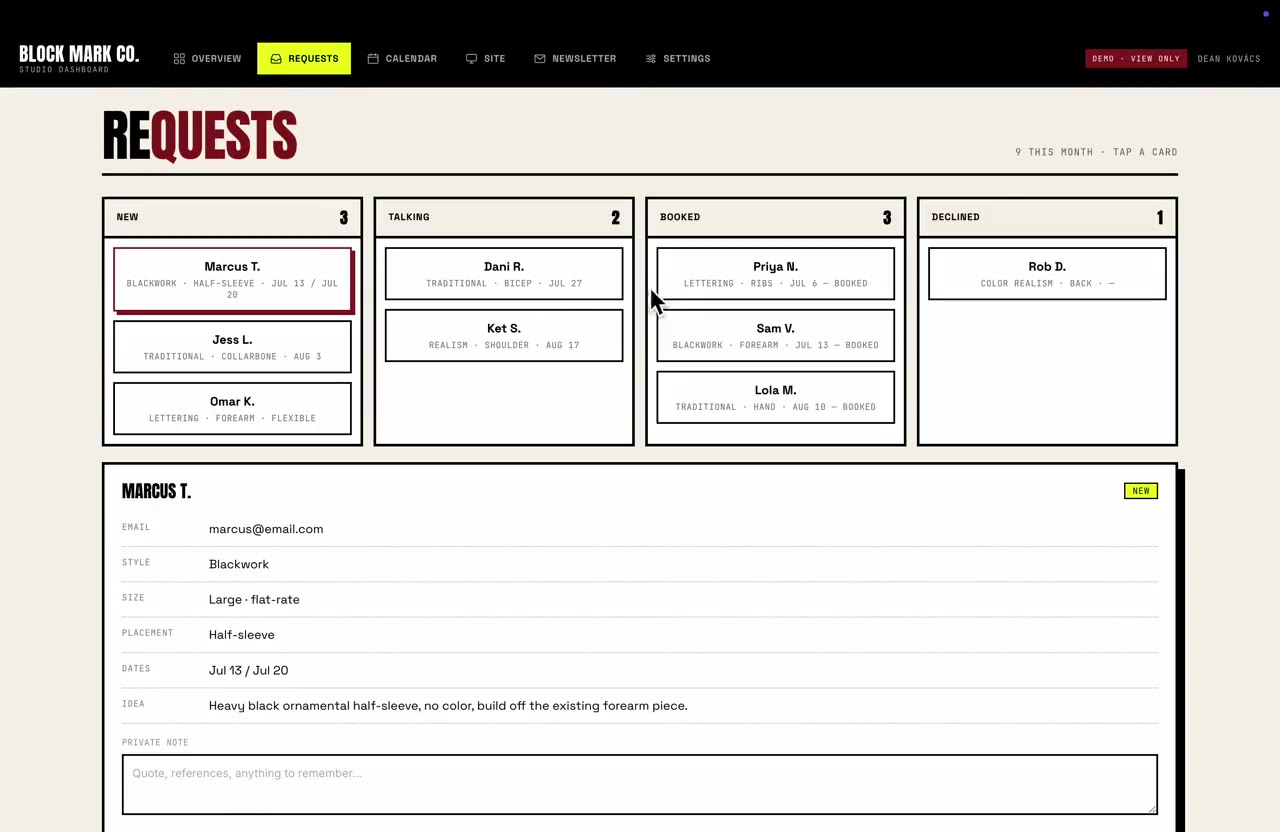
It's a real, working demo — not screenshots. Open it and click around. No signup, nothing to install, nothing you can break that matters.
What it does, and what it doesn't do yet
Today
- Takes booking requests with references and intake details
- A calendar that fills from confirmed bookings — close a week for travel or time off and it stops being offered, while your walk-in days stay posted
- Keeps notes and photos against each client
- Lets you edit your own pages — flash, policies, prices
Not yet
- Taking deposits by card
- Class packs or memberships
I'd rather tell you that here than after you've paid. If you need one of those, say so — I built the back end, so I can build to fit, and you'd get a fixed quote before anything starts.
What it costs
Four to six weeks for a full build. Three rounds of changes included. Fixed quote in writing before anything starts, and your domain stays in your name on your card. Full pricing and what's included →
Questions artists ask
- Can I still take bookings through DMs?
- Of course — and most people do at first. The difference is you get somewhere to send the ones that turn into twenty messages: "fill this out and I'll get back to you properly." Your site stops being a business card and starts doing work.
- I'm booked out. Can I turn requests off?
- Yes. Close the form, put up whatever message you want, reopen it when you're ready. You do that yourself, not by messaging me.
- I guest spot and travel. Can I show dates?
- Yes — post the city and dates you're taking, and requests come in against them so you're not sorting out who wants what while you're on the road.
- What about flash?
- A flash page you update yourself, with pieces marked available or claimed. You add them, you mark them gone.
- I share a shop with other artists. Can they use it too?
- Yes — each artist gets their own page with their own portfolio, and requests route to the right person rather than into one shared pile. Works whether the shop pays for it or you each keep your own books.
- Do I own it?
- Yes. The site, the code, the client data, and your domain — registered in your name, on your card. Unlike your Instagram, it should never need anyone's permission to stay yours.
Tell me how your booking works now
What you take, how people currently reach you, and what you're tired of doing by hand. I'll tell you straight whether I'm the right person and what it would cost.
Start a project